Travolio
A travel journal for iPhone and Android

Remember the fun times.

The midnight ramen. The wrong turn that turned out best. Who was there when it happened. Travolio keeps the good bits: write a few lines about today, pin your photos to the places, watch your world turn green, and let it bring each trip back to you, year after year.

By plane or by roadevery trip goes in.

Write about today Photos on the globe Your travel card Friends' travels

No account. No ads. No tracking.

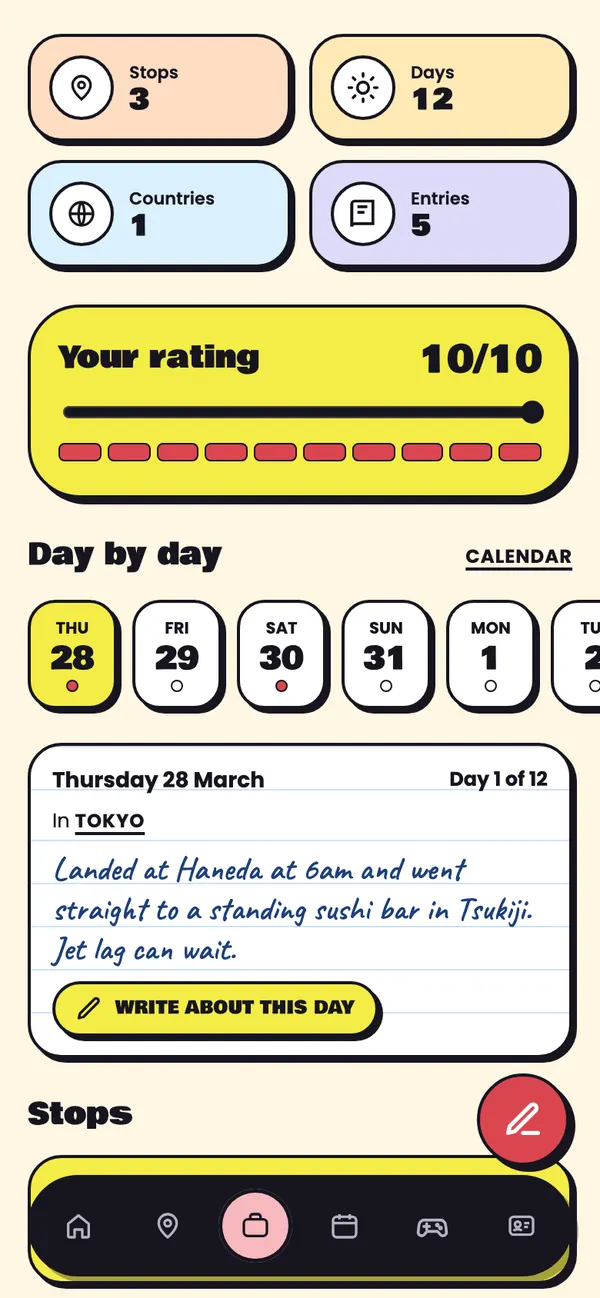
A journey in Travolio: a 10 out of 10 rating and a handwritten entry for day one in Tokyo
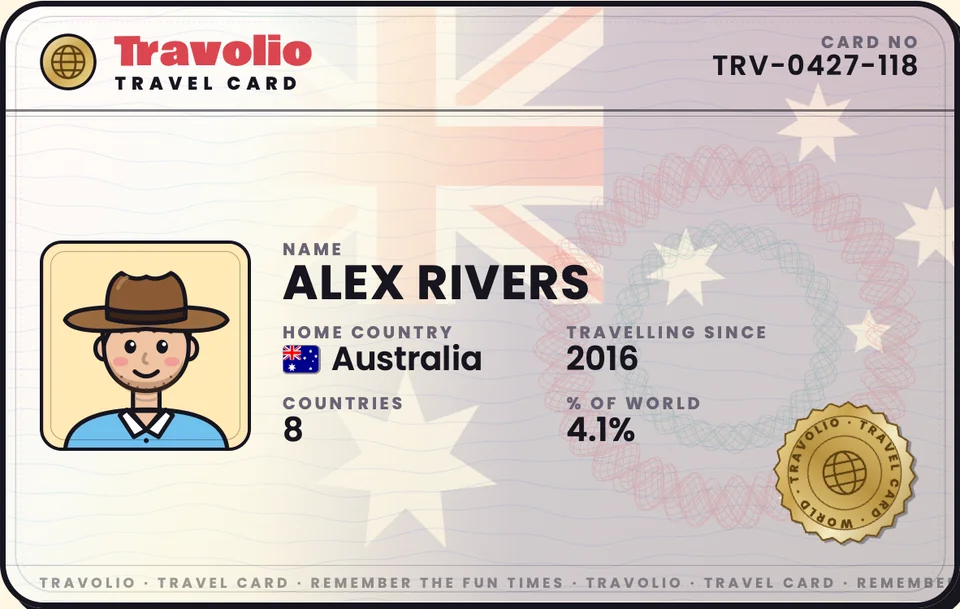
The Travolio travel card for Alex Rivers: his traveller in an Akubra, home country Australia with its flag behind, travelling since 2016, 8 countries, and a gold seal
How it works

Four steps to a world of memories

  1. Add a journey

    A Trip by plane, or a Road trip by car. Type in the cities and dates: each country turns green, each city gets a star, and a road trip draws the drive.

  2. Write and add photos

    A few lines about today, the highlights, who was there. Pin your photos to the places they belong.

  3. Make it yours

    Pick a traveller name your friends can find, put together your cartoon traveller and a hat, and fill in your Travolio travel card.

  4. Relive it

    On this day, memories and slideshows bring the trip back. Your friends' travels fill in the Network globe.

The journal

A few lines today. A smile for years.

Trips go fast and the details fade. Travolio makes it easy to catch them while they're fresh, then hands them back to you when you least expect it.

Write about today

Your trip, day by day

Each day of a journey has its own page in Travolio's handwritten look. Jot down what happened, mark the highlights and note who you were with, so the story is all there when you come back to it.

  • Write about today in seconds, or catch up on any day later.
  • Highlights: star the moments you'll want to tell people about.
  • Who you were with: add the people who made the day.
  • Rate each journey out of 10. Your best climb the Top trips board.
Saturday 30 MarchDay 3 of 12

In KYOTO

Up at 5 for Fushimi Inari before the crowds. Sam counted the gates and gave up at 400. Best matcha of my life after.

Highlight SPwith Sam and Priya
On this day

One year ago you were in Kyoto.

Read it again
Memories and On this day

The good times come back to you

On this day brings back what you wrote a year ago, two years ago, ten. Memories gathers your highlights, so a rainy Tuesday can turn into a little trip back to the beach.
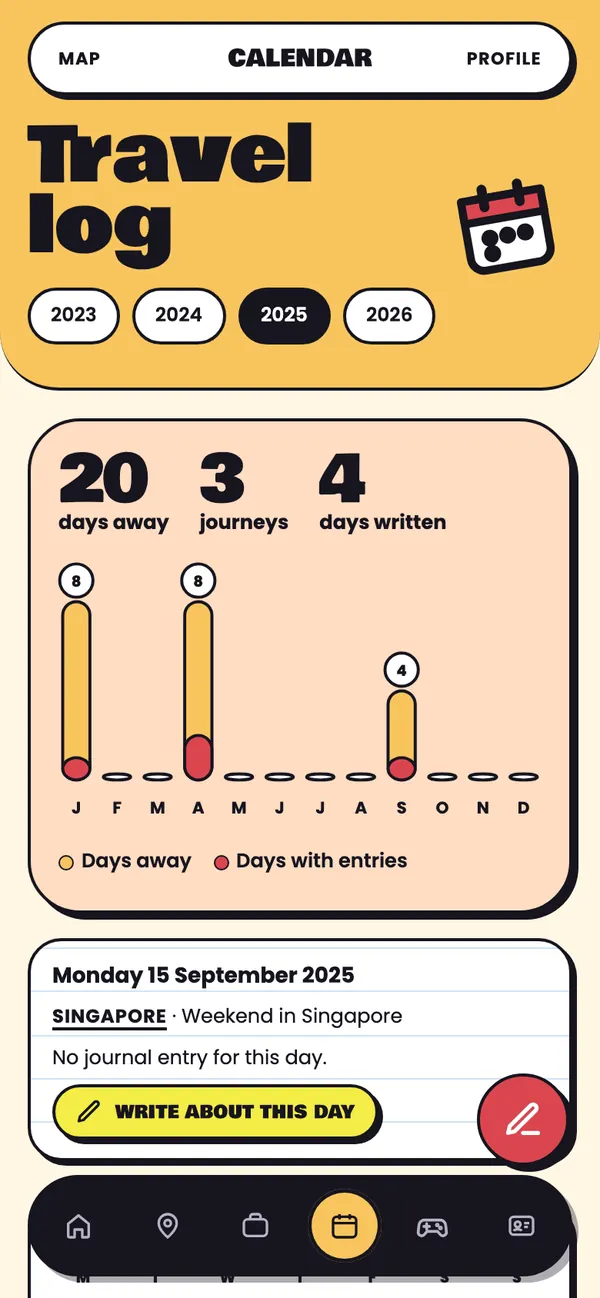
  • The calendar shows every day away, coloured by journey, with the days you wrote about marked.
  • Tap any day to read it again.
  • Tips for next time: notes to your future self by country, from food to getting around.
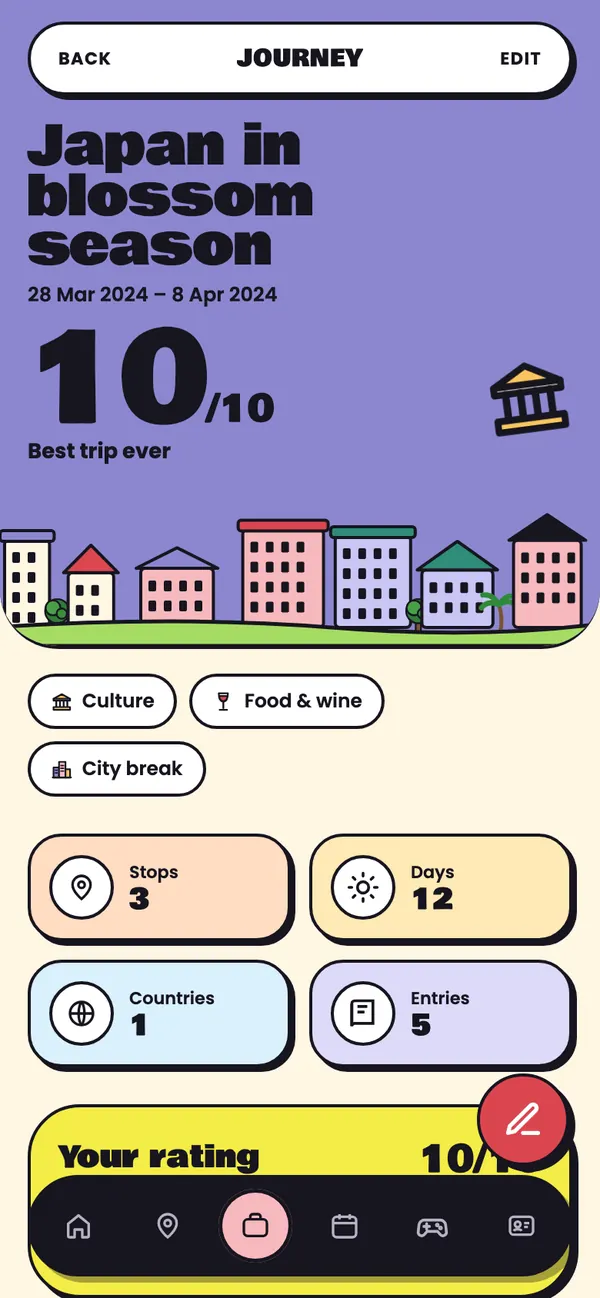
A journey page: Japan in blossom season, rated 10 out of 10, with tags
The travel log: days away and days with journal entries for each month of the year
Photos

Spin the globe. See your photos.

Attach photos from your library to the places you've been. Then give the globe a spin and there they are, pinned to the cities you put them with. If a photo knows where it was taken, Travolio suggests the place.

  • Add photos to any journey, place or day you wrote about.
  • They sit on the globe and in your journal, side by side with what you wrote.
  • Your photos stay on your phone. Travolio never uploads them.
Lisbon Kyoto Byron Bay
Slideshows

Press play on a whole trip

Turn any journey or place into a slideshow: your photos one after another, each with its place, its date and your caption, with a gentle pan and zoom. Sit back on the couch with whoever was there and live it again.

  • Made from the photos already in your journal. Pick a look: Postcard, Polaroid or Plain.
  • Save the ones you love. They play on your phone, and nothing is uploaded.
Day 4, Byron Bay First swim of the trip. Freezing.
Road trips

By plane, or by road

Some trips are flights and cities. Some are a car, a map and a long way between bakeries. Travolio keeps both kinds, and each gets its own look.

Trip

Fly in, stay a while, fly on. Your cities and dates, with yellow flight dashes across the globe and a little plane on the map.

Road trip

A drive, town by town: the stops in the order you drove them, how far you went and where you slept. The map draws it as a road, with a little car.

Tap + New in Journeys and pick Trip or Road trip. Both kinds turn your countries green.

The road-trip builder

Every stop, in the order you drove it

Add the towns one after another. Drag the dots to change the order, and give each stop its day and its nights: a night is a stay, and the towns you only drove through have none.
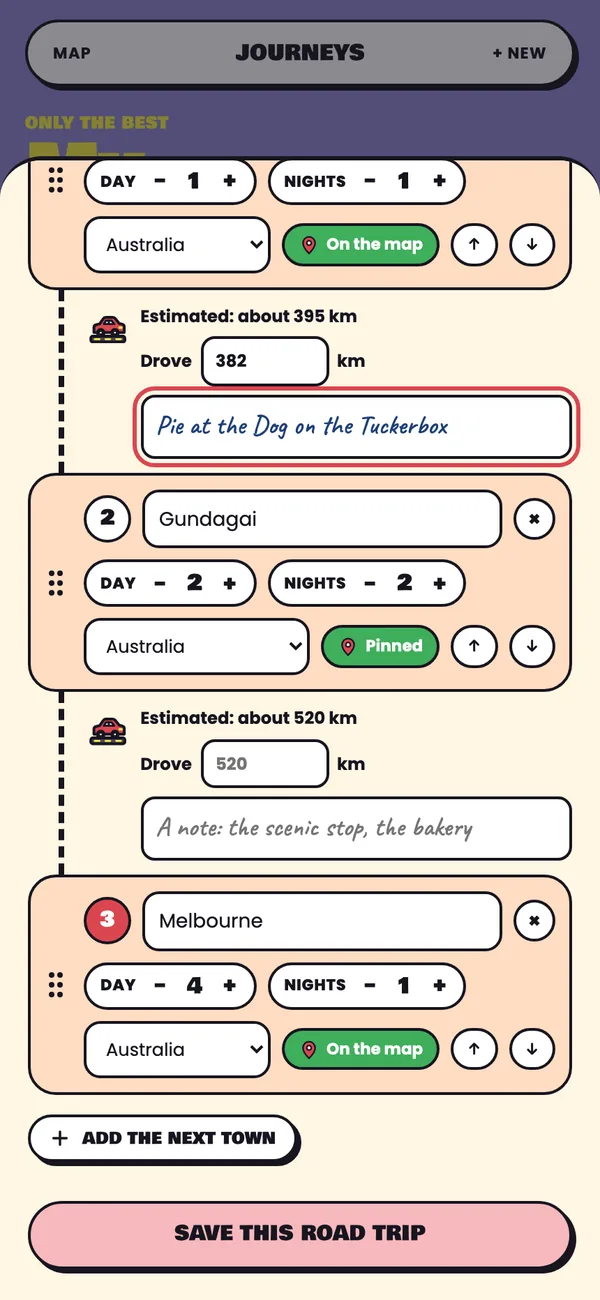
  • Each leg gets an estimate, like "about 395 km", worked out on your phone. Know the real number? Type it in instead.
  • Add a note to any leg: the scenic stop, the bakery, the pie you still talk about.
  • A town Travolio doesn't know? Place it on the map yourself.
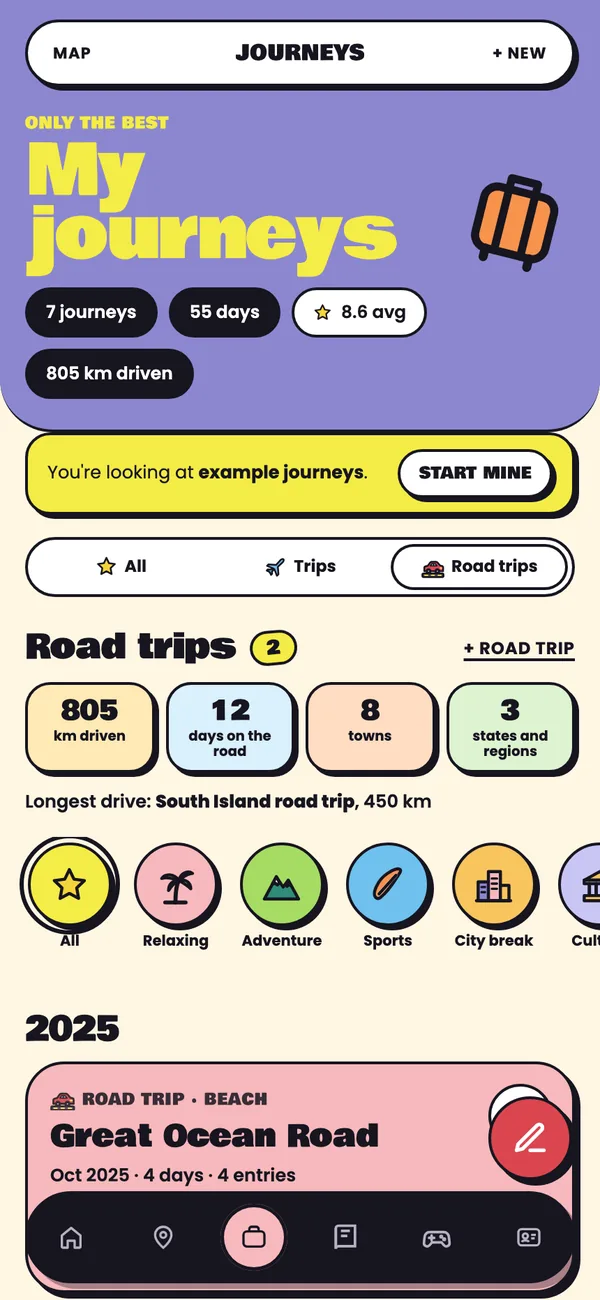
  • Journeys can show just your trips or just your road trips, with your total km driven, days on the road and your longest drive.
The road-trip builder: stops numbered in driving order, each with its day and nights, and between them the car icon with an estimate of about 395 km, the kilometres driven and a note
Journeys filtered to road trips: 805 km driven, 12 days on the road, 8 towns and 3 states and regions, with the longest drive and the Great Ocean Road card
Replay the drive

Watch the little car drive it again

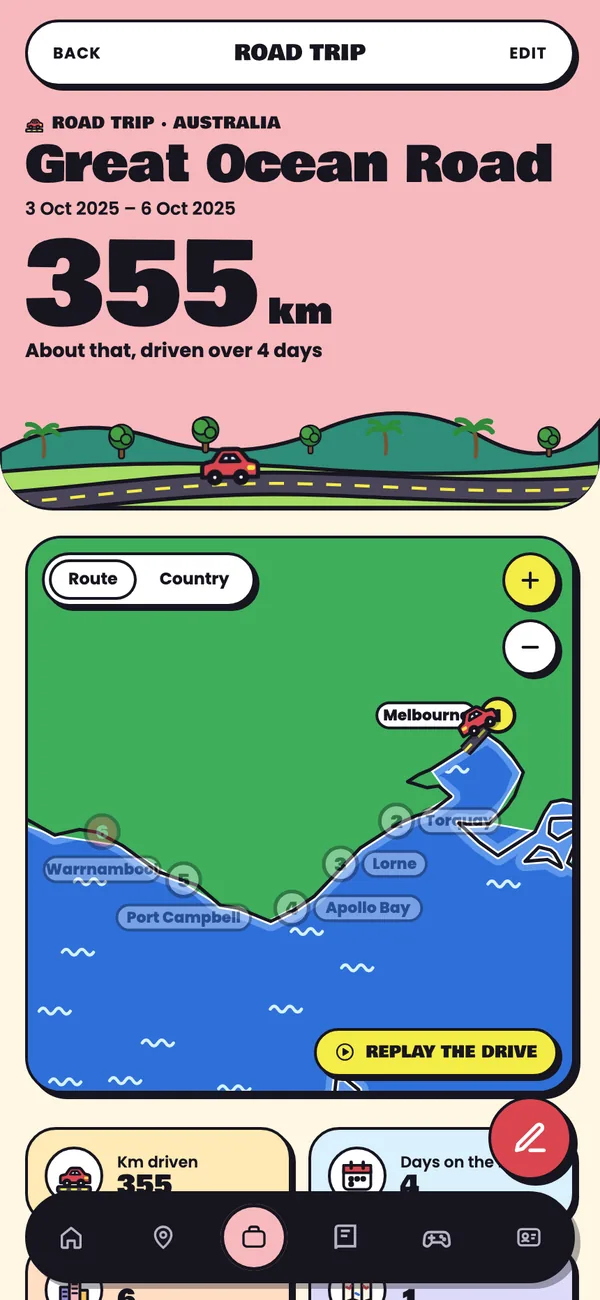
Every road trip gets its own page: a map of the country with a dashed road from town to town, numbered stops, and a little car that drives the whole route. Tap Replay the drive and off it goes again.

355km driven
4days on the road
6towns
1state

The example Great Ocean Road trip: Melbourne, Torquay, Lorne, Apollo Bay, Port Campbell and Warrnambool.
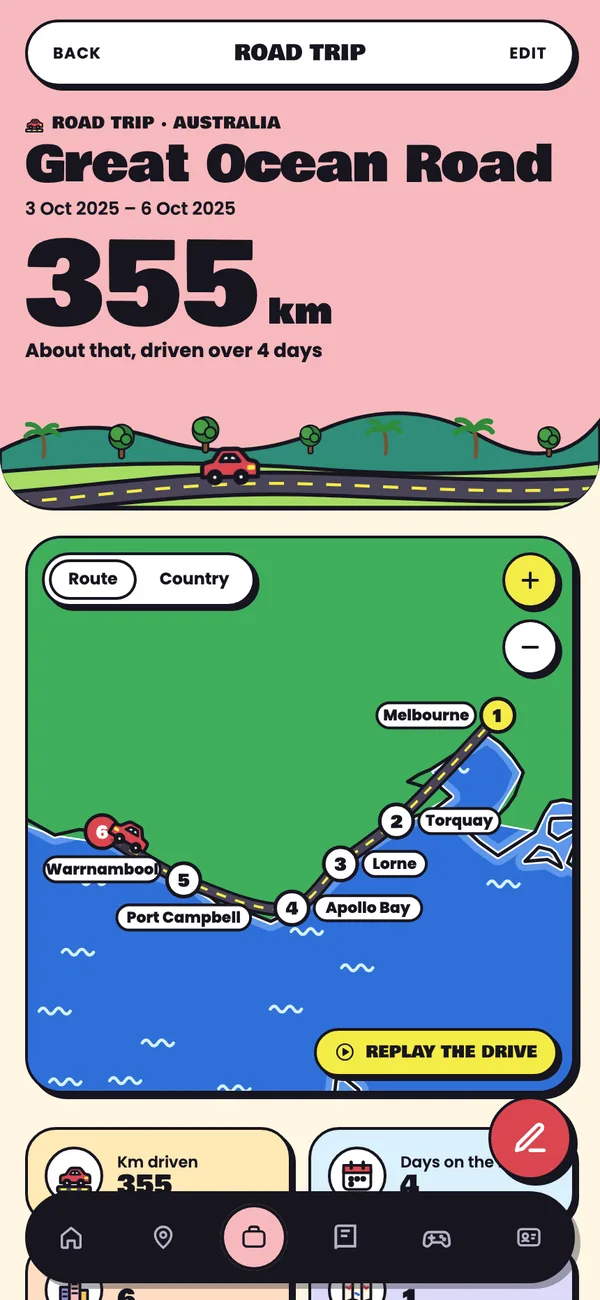
  • Switch between the route and the whole country, and pinch to zoom.
  • The drive lists each stop with its day, its nights and the state it's in, and each leg with its km and your note.
  • Your journal, photos and packing list for the trip are one tap away.
The Great Ocean Road trip: 355 km driven over 4 days, and a map of Victoria's coast with a dashed road through six numbered stops, a little red car at the end and a Replay the drive button
Replay the drive in action: the little red car setting off from Melbourne, with the stops still to come shown faintly
Focus on a country

6 of 8 states. Who's counting? You are.

Open a country and tap Focus on it. Its states, provinces or regions are drawn in, green where you've been and red where you haven't, with a count like "6 of 8 states" and the full list underneath. Your road trips are drawn across it too.

18 countries have their states and regions drawn in:

  • Australiastates
  • USAstates
  • Canadaprovinces
  • Mexicostates
  • Brazilstates
  • UKnations
  • Irelandprovinces
  • Franceregions
  • Spainregions
  • Italyregions
  • Germanystates
  • Russiaregions
  • Indiastates
  • Chinaprovinces
  • Japanprefectures
  • Indonesiaprovinces
  • South Africaprovinces
  • New Zealandregions

Focus on a country is part of the map, so it's in Light. Road trips are journeys, so they're part of Premium, along with the road-trip routes on the map. The maps are built into the app and work offline.
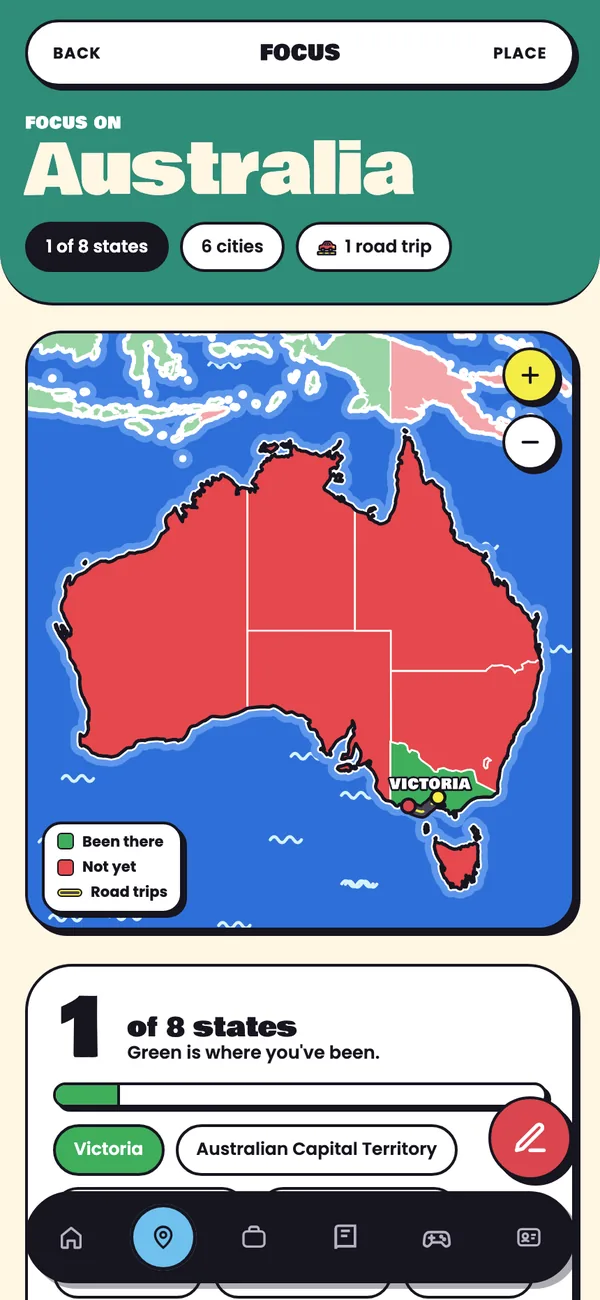
Focus on Australia: a map with Victoria in green and the other states in red, a road trip drawn along the coast, and 1 of 8 states
Make it yours

Your card. Your traveller. Your world.

Every traveller gets a Travolio travel card that fills itself in as you go, and a little cartoon you to take along.

The Travolio travel card

A travel card worth showing off

Fine guilloche lines, a gold seal and the flag of your home country behind your name. Your countries, your share of the world and the year you started travelling sit on the front. Flip it over for your travel record, with a flag stamp for every country you've been to.

  • The back: your countries, cities, journeys and days away, favourite places, travel style and motto.
  • Your traveller sits on the front. Tap it to change your look any time.
  • A souvenir, not an ID. It never asks for passport or document numbers.

Tap the card to flip it

A Travolio card for Yuki Tanaka from Japan, with her traveller in a sugegasa and the Japanese flag behind the name A Travolio card for Bruna Costa from Brazil, with her traveller in a bucket hat and sunnies and the Brazilian flag behind the name
Your traveller

Meet the digital you

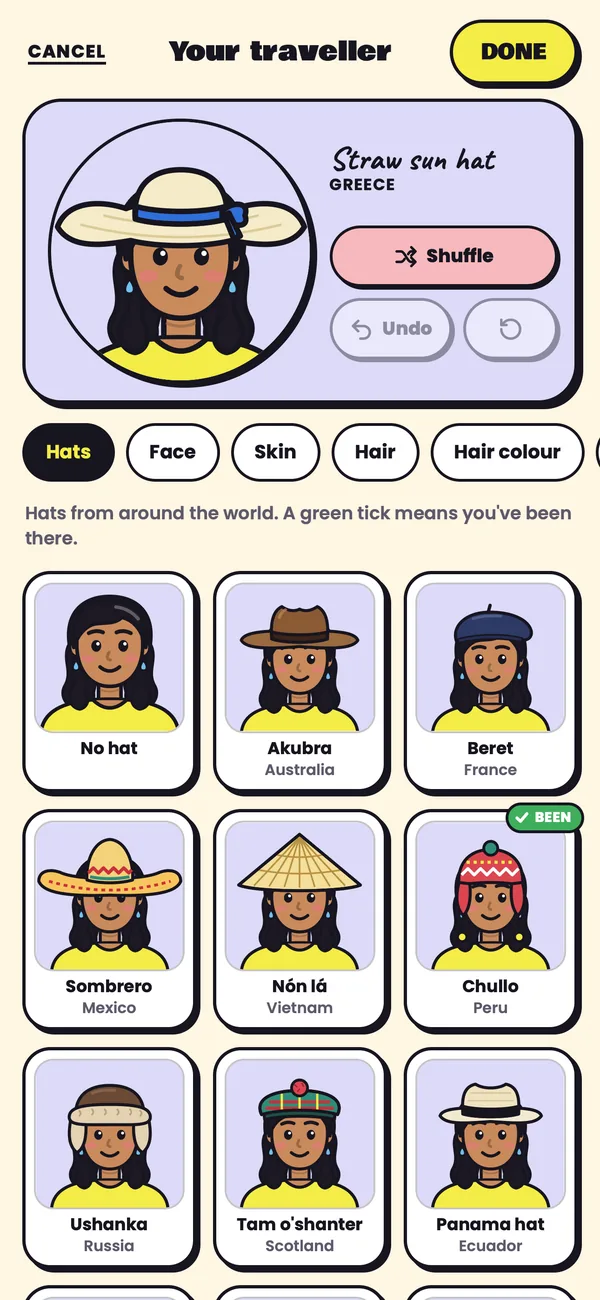
Put together a relaxed cartoon you: face, skin, hair and hair colour, brows, eyes, mouth, facial hair, glasses, freckles, earrings, top and background. Then pick a hat from somewhere you've been, or somewhere you're dreaming of. Or tap Shuffle and see who turns up.

  • You make it in the first-run tour, right after you pick your traveller name, and you can change it any time.
  • It goes on your travel card and on Home. Friends see it, and if you let travellers find you, it's on your profile in search.
  • It's a drawing, saved as a short code. Travolio never asks for a photo of you.

25 hats from around the world, each with where it's from. A green tick means you've been there.
  • AkubraAustralia
  • BeretFrance
  • SombreroMexico
  • Nón láVietnam
  • ChulloPeru
  • UshankaRussia
  • Tam o'shanterScotland
  • Panama hatEcuador
  • Tyrolean hatAustria
  • Flat capIreland
  • BowlerEngland
  • Cowboy hatUSA
  • FezMorocco
  • SugegasaJapan
  • Flower leiHawaii
  • Campaign hatCanada
  • Gondolier boaterItaly
  • Bucket hatNew Zealand
  • Bobble beanieIceland
  • Sun visorBrazil
  • Captain's capCroatia
  • Safari bush hatKenya
  • Straw sun hatGreece
  • Gaucho hatArgentina
  • Midsummer wreathSweden
The Your traveller builder in Travolio: a big preview with Shuffle and Undo, tabs for Hats, Face, Skin, Hair and Hair colour, and a grid of hats each with its country, like Akubra, Australia and Chullo, Peru, with a Been tick
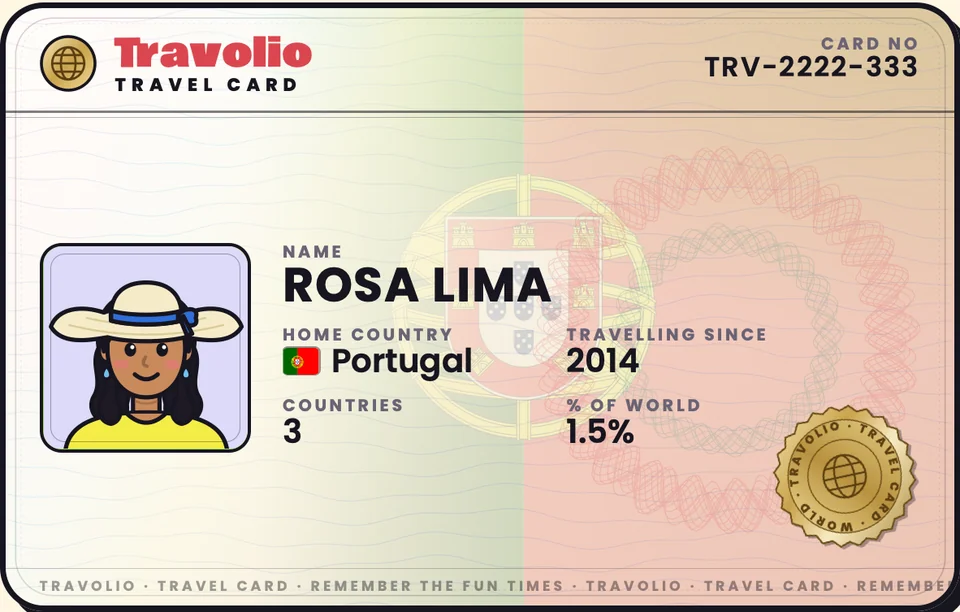
A Travolio travel card for Rosa Lima from Portugal, with her traveller in a straw sun hat on the front
A grinning traveller with freckles in a brown Akubra and a blue collar shirt
AkubraAustralia
A winking traveller with round glasses and pink hair in a navy beret and a striped top
BeretFrance
A laughing traveller with a moustache in a yellow sombrero
SombreroMexico
A relaxed traveller with long black hair in a conical nón lá
Nón láVietnam
A cheeky traveller with blonde hair and freckles in an orange bobble beanie and a blue hoodie
Bobble beanieIceland
A smiling traveller with big curls and hoop earrings wearing a flower lei
Flower leiHawaii
Friends

See where your friends have been

Add your friends and build a network of travellers you actually know. Their trips show up on your Network globe, coloured by how many of you have been, so you know exactly who to ask before you go.

  • Pick your traveller name, like @sam.travels, when you set up.
  • If you're 16 or older, travellers anywhere in the world can find you by it. It's on unless you tap Not now, and you can turn it off any time.
  • Search shows a traveller's globe, their countries and favourite places. Tap Add as friend, and nothing about your trips is shared until you both say yes.
  • Or swap a code or a link. What you share is locked on your phone before it's sent, so our server can't read it.
  • Report and Block are on every profile. We look at every report within 24 hours.
Everywhere you've been

Watch your world turn green

These are real screens from the app, showing the example journeys of a traveller called Alex. Yours start empty and fill in as you go.

The globe and the map

Every country green, every city a star

Add a journey and Travolio colours it in. Spin the globe with a finger, or open the whole map and pinch to zoom.
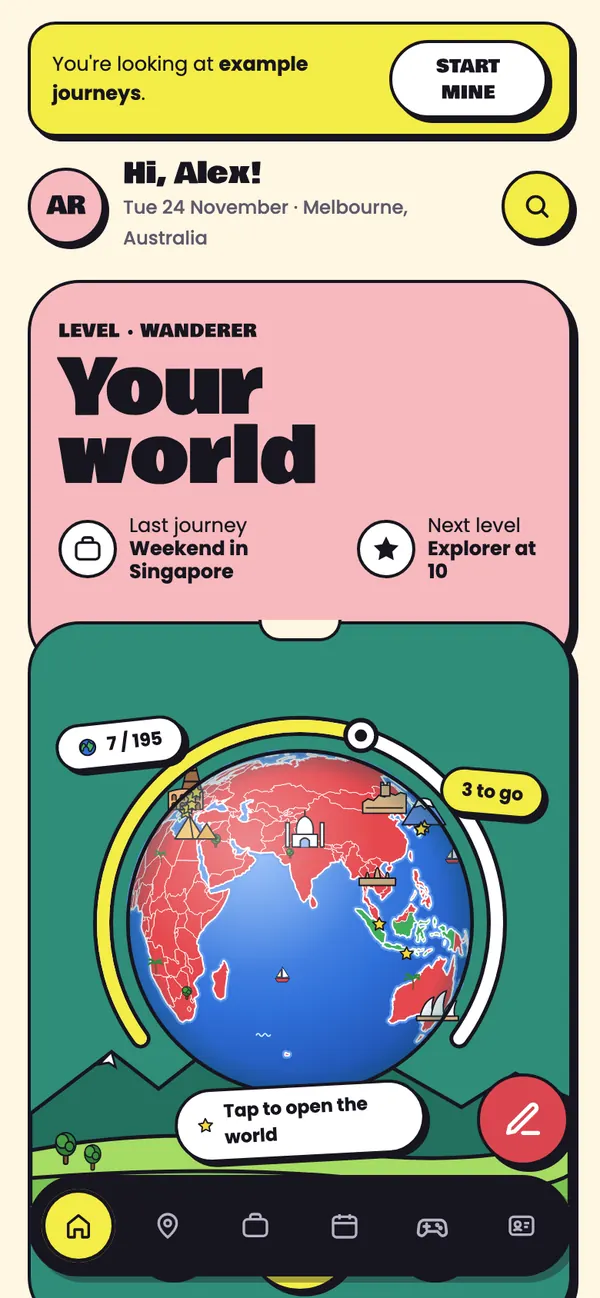
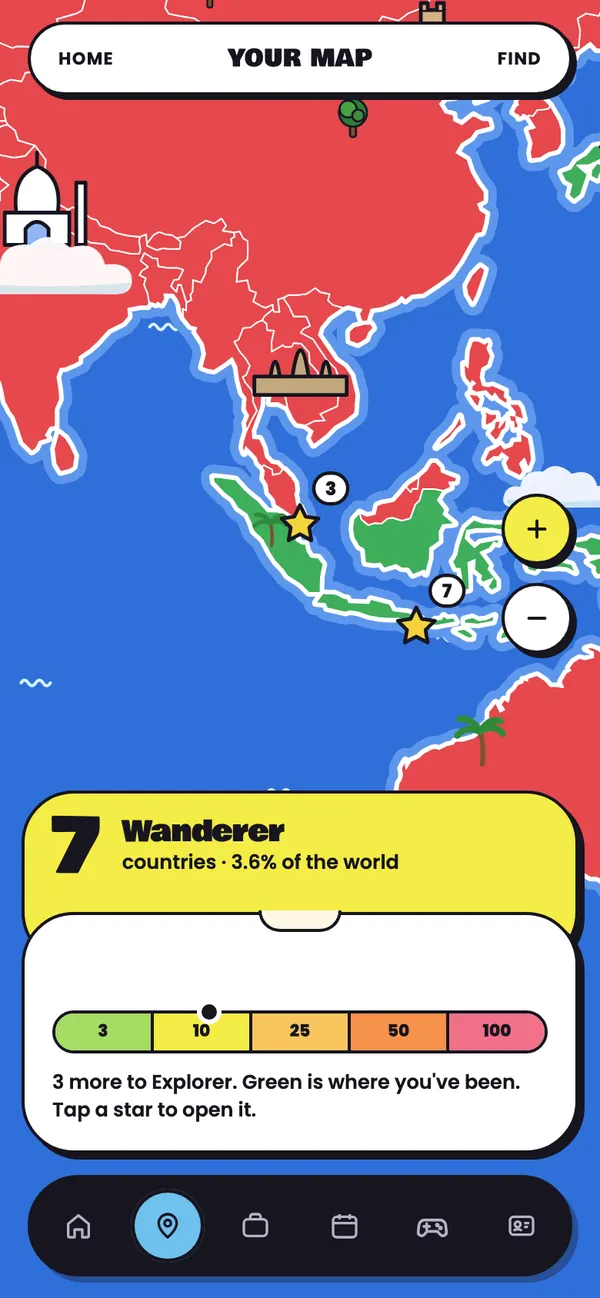
  • Each star shows how many days you spent there. Tap one to open that place and its journal.
  • Your country count, the share of the world you've seen, and a level that climbs as you go.
The home globe with visited countries in green
The zoomable map with yellow stars and day counts
Tips for next time

Notes to your future self

Keep what you learnt, country by country: food, getting around, where to stay, money, safety and must-sees. Each journey has its own packing list too, so next time starts easier.
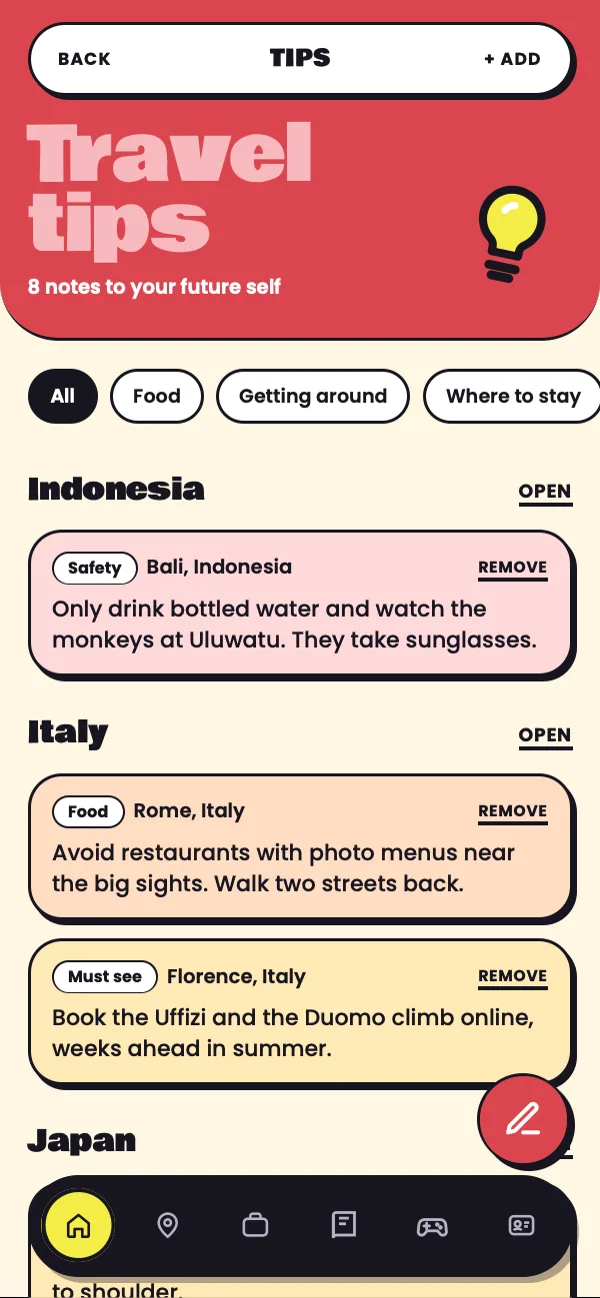
Travel tips sorted by country: food, getting around, safety and must-sees
Play now, right here

Have a go at Atlas Dash

The game inside Travolio works in your browser too. Find the country, pin the city, pick the flag: three rounds of sixty seconds each.

  • Countries. Spin the globe and tap it. A hundred points each.
  • Cities. Drop a pin. The closer you land, the more you score.
  • Flags. Read the country, then pick its flag from five.
  • Deep zoom. Pinch up to 40 times closer, and sharper borders appear as you go. Handy for pinning that city.

Your best score stays on this device. Nothing is sent anywhere.

Atlas Dash start screen: three rounds, countries, cities and flags
Our promises

Your trips are yours

Travolio is a journal, not a data business. No account, no ads, no analytics, no tracking.

Travolio never asks for passport, ID, visa, insurance or health details.

KEPT ON YOUR PHONE · NO ID · NO HEALTH DATA ·

Stays on your phone

Your journal, photos, road trips, tips and card are kept on your phone. We never receive them. Export a backup whenever you like.

Friends, locked tight

What you share with friends is end-to-end encrypted on your phone. It passes through our postbox, which can't read it, and is wiped within days.

No ID, no health data

There's nowhere to put passport, visa or insurance numbers, or vaccinations. Travolio is for remembering trips, not paperwork.

Public profiles: 16+, your call

Only people 16 or older can be found in search, and you can switch it off any time. Your journal, photos, dates and where you are now are never public.

The privacy policy has every detail.

Free in our feedback stage

Download early, and it's free for you, forever

Everyone who gets Travolio during our feedback stage keeps everything in it free, for life. Here's what we're thinking for later.

Light

Track where you've been

Free for everyone.

  • The globe and map of every country and city you've been to
  • How much of the world you've seen
  • Your Travolio card and Atlas Dash
  • Friends: see where your mates have been
Premium

Remember all of it

Everything in Light, plus:

  • Journeys, stops, tags and ratings out of 10Trips and road trips, with km driven and Replay the drive
  • The journal, highlights and who you were with
  • On this day, and memories from past trips
  • Photos on your places, and slideshows of them
  • The calendar of every day away
  • Travel tips, country by country, and a packing list for every journey

Early downloads keep Premium free, for life.

Light and Premium in full
Good questions

Before you pack

Is Travolio free?

Yes, while we build it with our first travellers. If you get it during our feedback stage, Premium stays free for you, for life. Prices haven't been set. How Light and Premium work.

Where is my journal kept?

On your phone, and nowhere else. There's no account and we never receive your journeys, entries, photos, tips or card. Your phone's own backup includes them, and you can export your own backup file at any time.

Who can see my trips?

Only friends you've both said yes to, and only what you choose to share. If you're 16 or older and let travellers find you, anyone can see a short public profile: your name and @handle, home country, the countries you've been to and a few favourite places. Your journal, photos, dates and where you are now are never public.

Is there a photo of me on my card?

No. Your card shows your traveller, a cartoon you put together yourself, saved as a short code. Friends see it, and so does search if you let travellers find you. Travolio never asks for a photo of you.

Can I keep road trips?

Yes. Pick Road trip when you add a journey, then add the towns in the order you drove them. Travolio estimates each leg on your phone (type in the real km if you know it), draws the drive on a map of the country and lets you replay it. More about road trips.

Do I need the internet?

No. The globe, the maps, the states and regions, your photos and Atlas Dash are built into the app, so your journal works on a plane, a ferry or a mountain. Friends and search need a connection.

More answers in Support

iPhone and Android

Join the Founders beta

Travolio is free while we build it with our first travellers, and if you join now it stays free for you, forever. Email us and we'll send your invite for iPhone or Android.

support@travolio.app
Email for an invite iPhone Android

Tell us which phone you use. Already travelling with us? Tell us what you think in the Founders feedback form, or in the app at Settings, Founders feedback: seven questions, all optional.